Case study
Leading UX design through a university-wide transformation
Overview
OneWeb was an ambitious three-year initiative that transformed the University of Southampton’s digital services, primarily focusing on the website. This programme emerged from the recognition that the University’s previous website was cluttered with outdated or redundant content and sub-optimal journeys, hindering users from completing tasks and impeding the University from achieving its objectives.
OneWeb represented a complete overhaul, not just a superficial update, it was akin to ‘installing a new engine rather than just repainting the car.’ Inspired by user-centric platforms like GOV.UK, the project prioritised user needs, underpinned by continuous and extensive testing.
Beyond its completion, the project’s vision includes ongoing analysis and refinements, aiming for continuous improvement in user experience. This initiative enhanced the University’s visibility in search rankings, streamlined on-site navigation, and significantly bolstered its reputation, aiding in recruiting new students and staff.
My role
I joined the University as a service designer and was promoted to acting head of UX design, leading one of three discipline teams (design, alongside content and research) within the digital user experience team, reporting to the Associate Director of Digital User Experience. I led the UX design team through the programme and its transition into business as usual.
As head of discipline I set the team’s design standards and ways of working, established the University’s design system and shared responsibility for priorities, planning and resourcing with the product manager. I represented UX design at programme level, building the senior stakeholder relationships needed to embed user-centred design across the organisation.
I led, mentored and trained the UX designers, growing the team’s capability in accessibility, research-informed design and our design-to-development workflow. Alongside leading the team I stayed hands-on, using quantitative data, user research and stakeholder input to design end-to-end products and services.
The work
Developing the UX team capability
Being a part of the University’s Digital User Experience Team was a privilege. I learned a great deal from my colleagues, and I hope they have also benefited from our collaboration.
Below are some of the key initiatives and projects I have worked on, but as with any talented multidisciplinary team, the effort was shared, and the outcomes were significantly elevated by our working so well together.
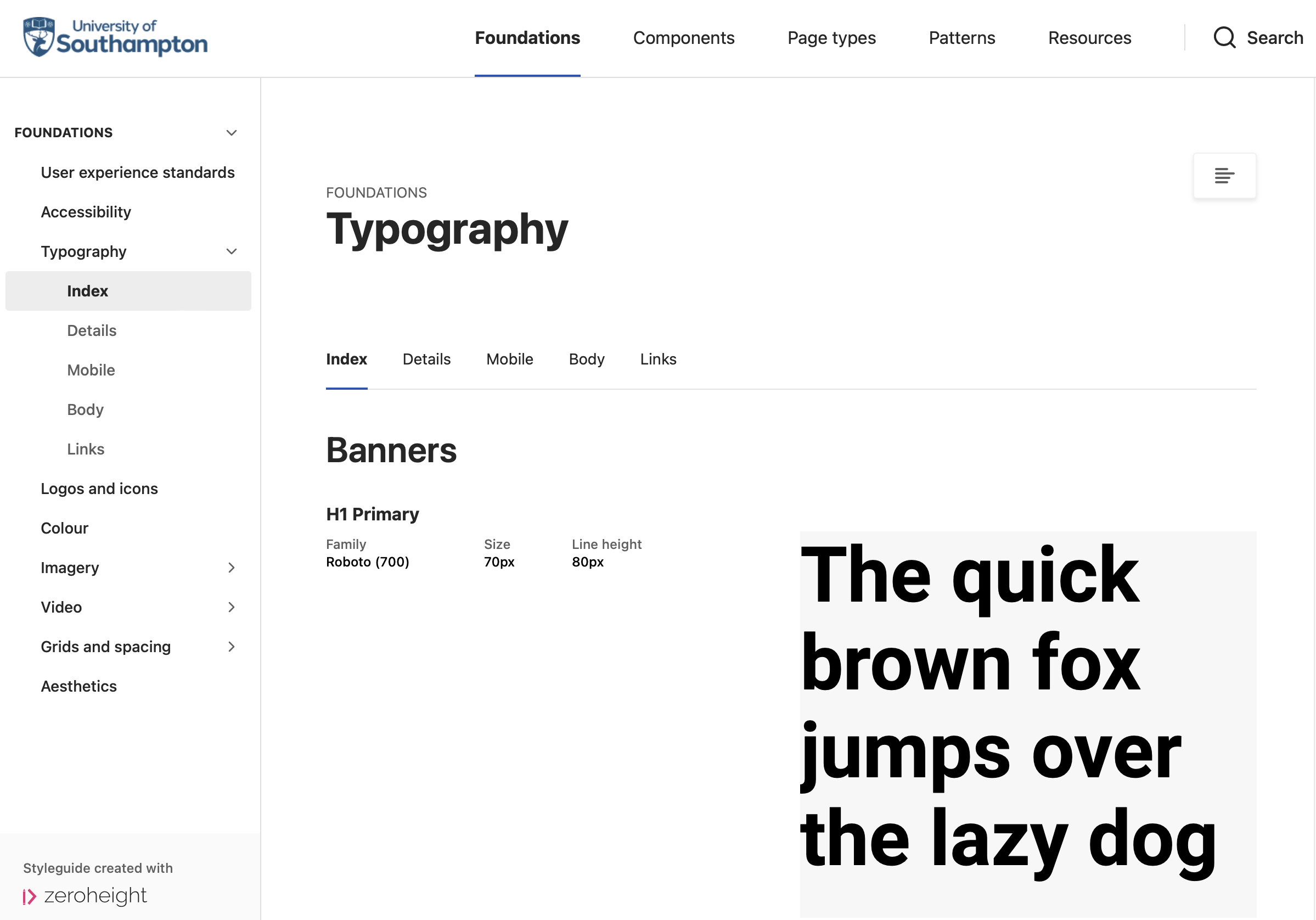
Design system
I initiated and developed the University’s digital design system, embedding user-centred principles to enhance digital experiences.
Designs selected for the system underwent rigorous user testing and stakeholder reviews, ensuring their effectiveness in meeting user needs and University requirements.
This system acts as a ‘single source of truth’ and encompasses design principles, a reference site, a UI toolkit, design starter templates, and development documentation.
It has empowered team members by opening up the design process, facilitated by training and co-design sessions. It has also streamlined communication and collaboration with the development team, contributing to a more cohesive and efficient design to dev workflow.
Accessibility
In line with the University’s Diversity and Inclusion strategy and legal requirements, adhering to WCAG 2.2 AA guidelines was fundamental to our design principles and working methods.
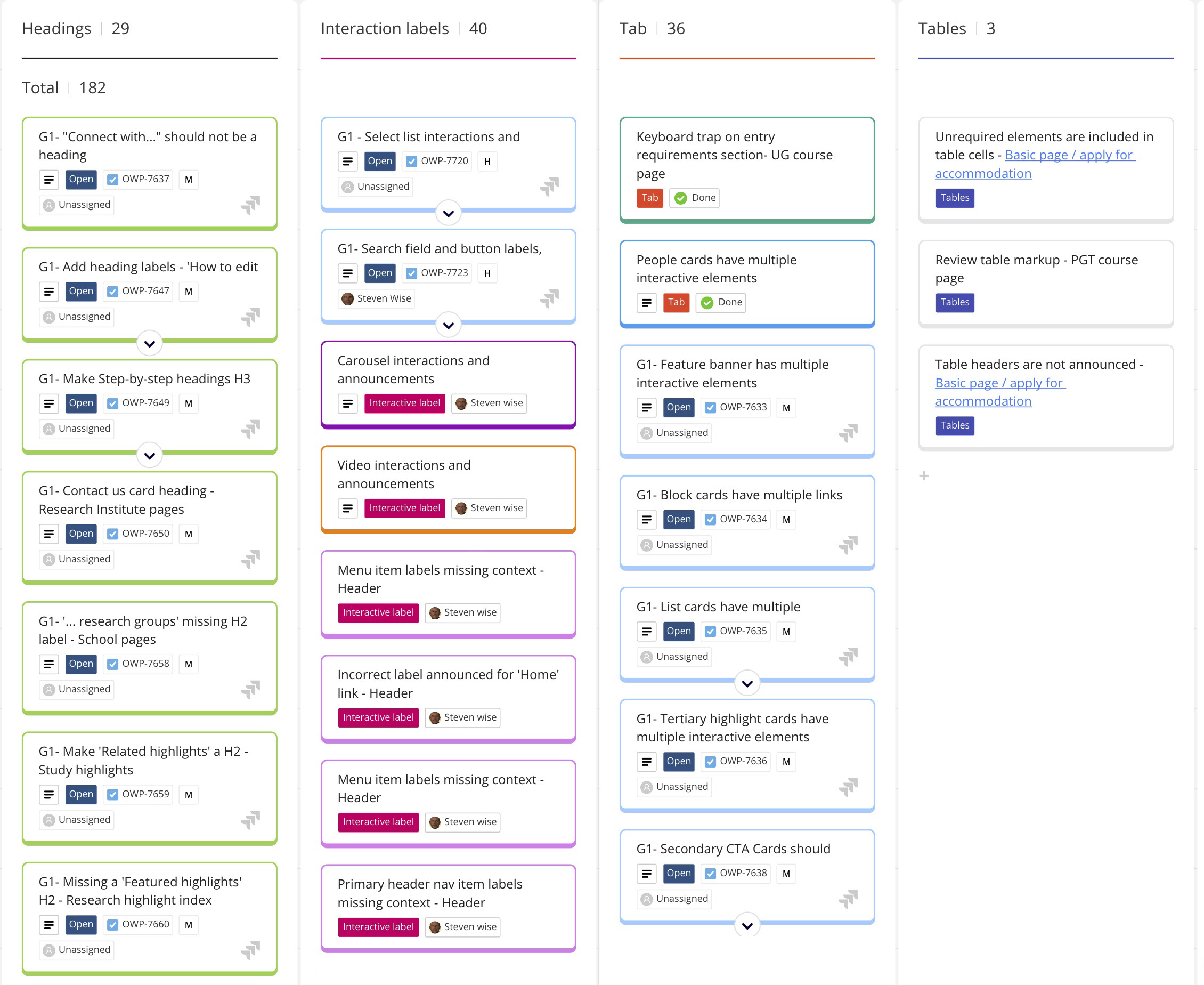
Integrated. I established practices that ingrained accessibility into our products and services. This included providing training for the Digital UX team, creating accessibility checklists, compiling developer documentation, and conducting manual UX quality assurance testing to ensure code compliance.
Team training and initiatives. Additionally, I initiated an ‘accessibility health check’. With assistance from other UX designers on my team, we organised a ‘bugathon’ that involved the wider digital UX team in testing the live site. This initiative not only enhanced the site’s accessibility but also fostered a deeper understanding of accessibility requirements among the team, equipping them with the knowledge and skills to meet these standards effectively.
Training, upskilling and mentoring
As a mentor and guide within the UX team, I played a significant role in upskilling team members. I provided training on essential design tools such as Figma, our in-house design system, and the UI toolkit. This standardised our approach, enhancing the team’s efficiency and creativity.
Mentoring. My mentoring role extended particularly to more junior UX designers. I offered guidance on design best practices to equip them with the skills necessary to develop in their roles.
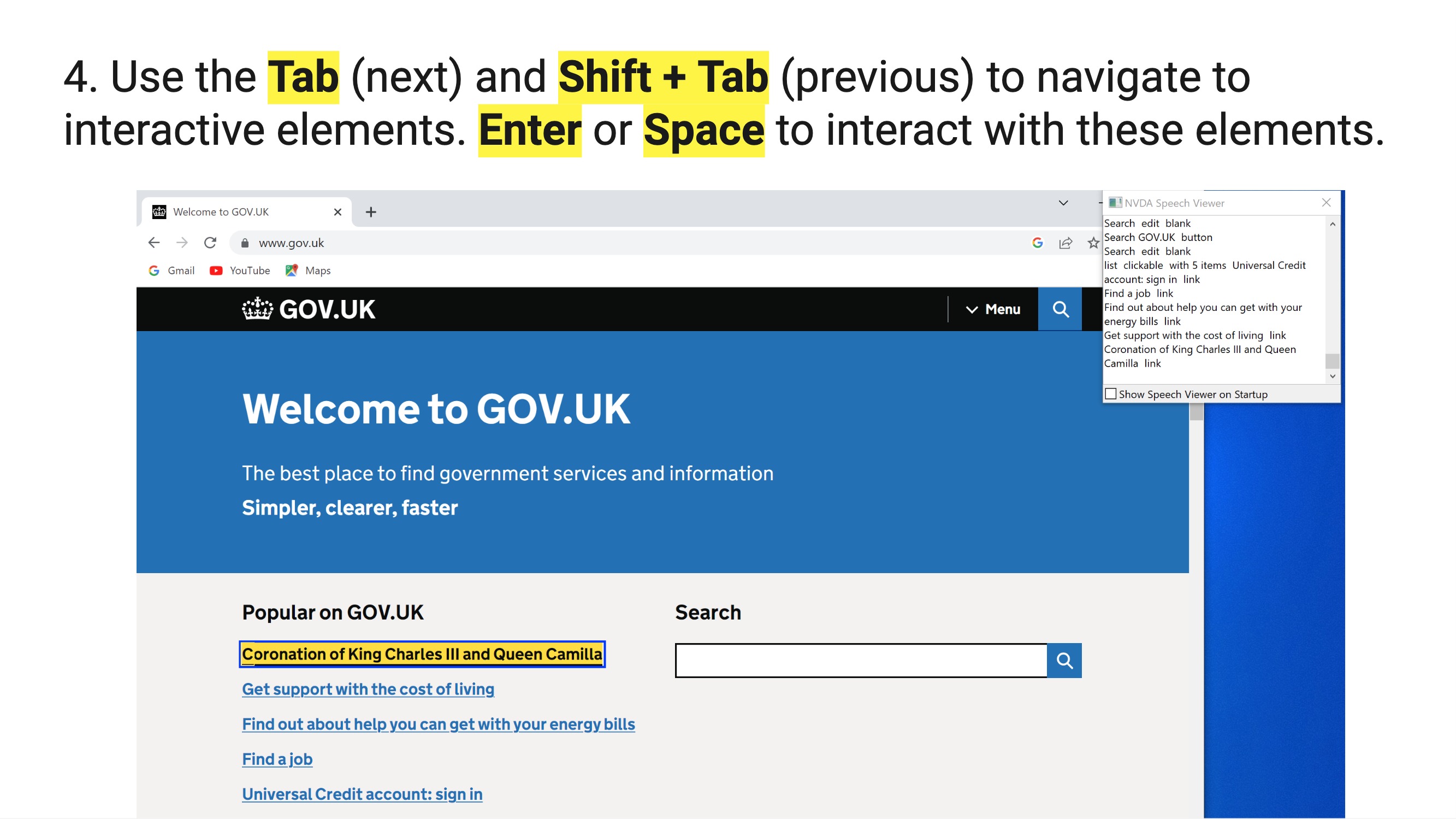
Training. I actively championed digital accessibility, participating in Global Accessibility Awareness Day (GAAD). During this event, I led a workshop teaching the team and University colleagues how to use a screen reader and carry out accessibility testing. This exercise underscored the importance of designing for all user needs, reinforcing our commitment to inclusive design.
Multidiscipline collaboration
As a key member of a multidisciplinary team comprising product managers, content designers, user researchers, performance analysts, SEO experts, and developers, I played an integral role in developing our Agile working methodologies.
Heads of discipline. My collaboration with other heads of discipline was pivotal in ensuring cohesive and collaborative work across different teams. In partnership with the product manager, I focused on setting priorities and allocating resources effectively to meet and exceed our product delivery expectations.
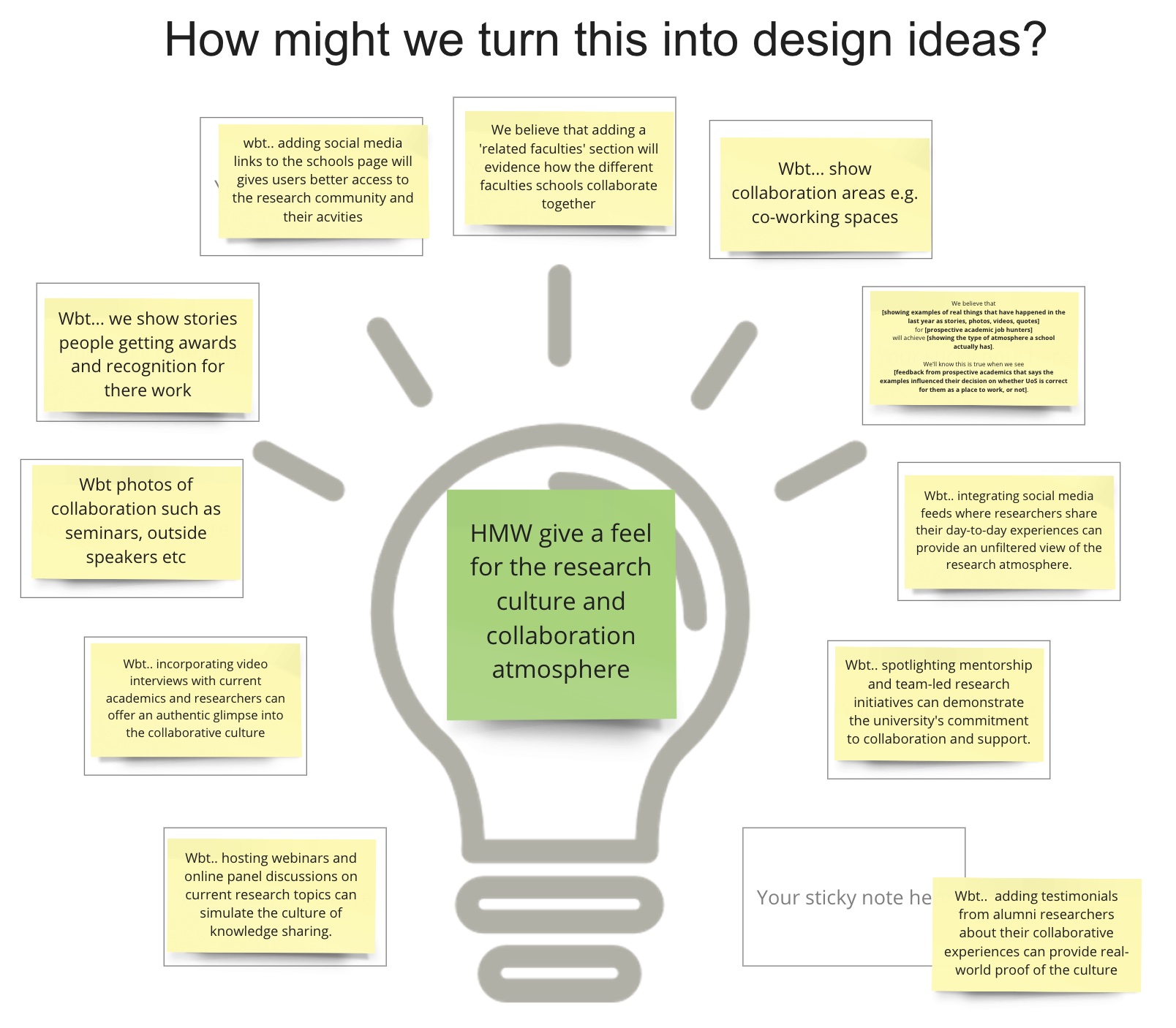
Ideation workshops. In the ideation workshops I led, our team harnessed insights from performance analytics, SEO considerations, user research, stakeholder feedback, and other sources. We employed techniques like ‘How Might We’ and ‘We Believe That’ statements to stimulate creativity and innovative thinking. Furthermore, we rigorously evaluated our product objectives and capabilities using tools like the Value Proposition Canvas, ensuring they aligned closely with customer needs and addressed their pain points.
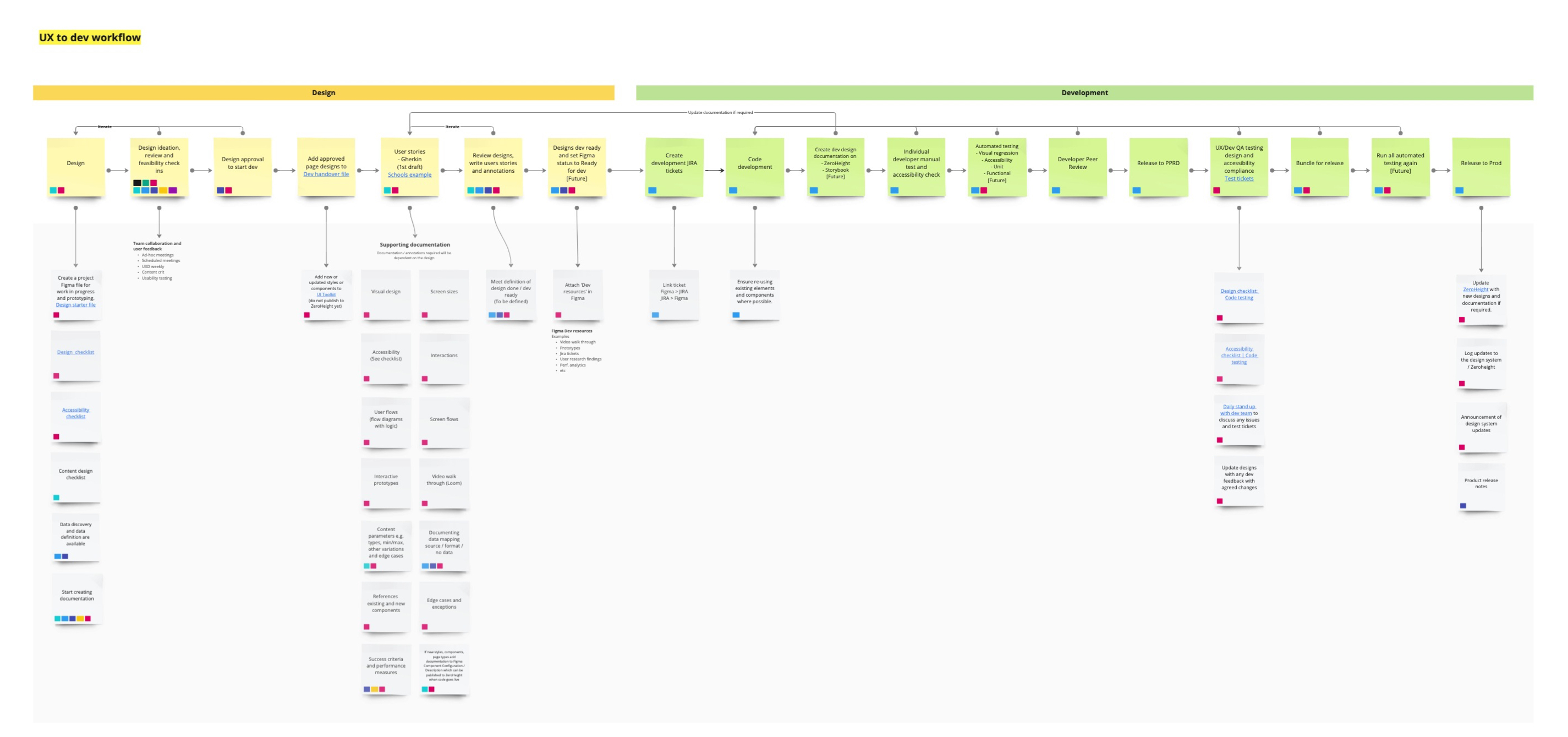
UX to developer workflow. In collaboration with the lead developer, we established a robust design-to-development workflow, significantly enhancing the standards and quality of our products and services. A key initiative was the documentation of designs using user story scenarios in ‘Gherkin’ syntax. This approach provided a shared language for effectively communicating design concepts and requirements between the design and development teams.
Project examples
Key projects I’ve been involved with at the University.
Study
I was instrumental in delivering the initial release of the ‘Study’ section of the website. After closely monitoring its performance in live and gathering stakeholder feedback, we looked to optimise it further.
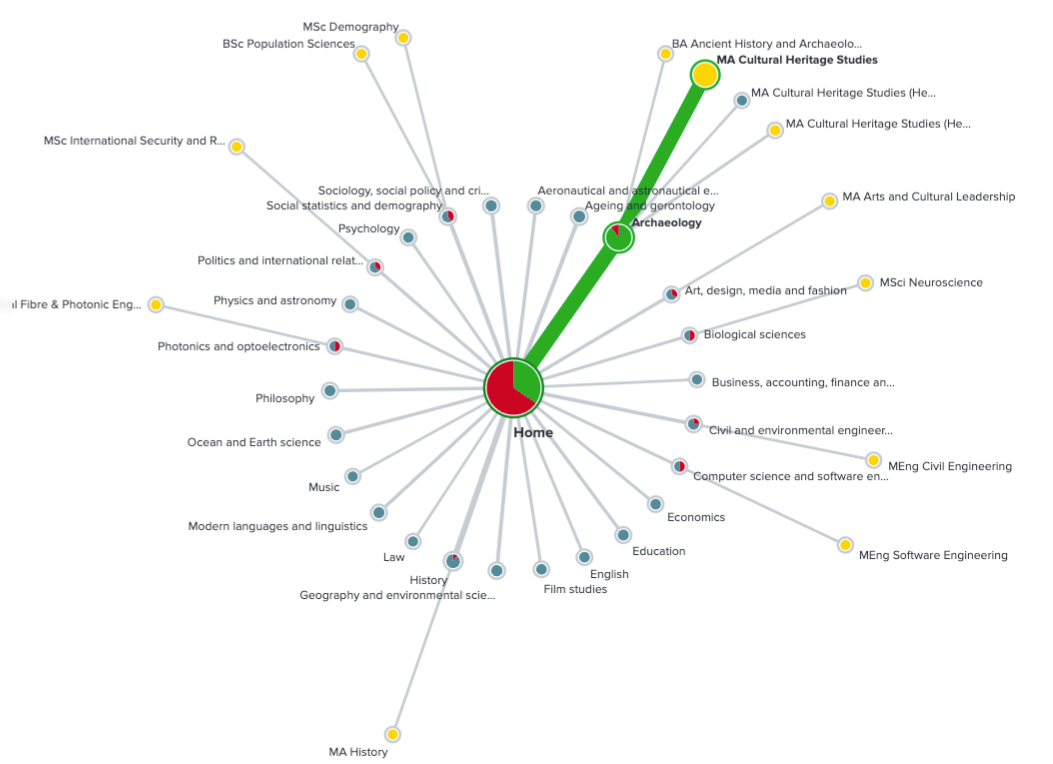
Recognising the critical user needs of course findability and information clarity, we conducted comprehensive Treejack testing to evaluate two variations of our subject taxonomy, one based on current live data and another aligned to the research area taxonomy. This involved 40 participants completing tasks to find specific courses, which provided insights into how effectively each taxonomy guided user behaviour.
Key findings revealed incremental but noteworthy improvements in areas like ‘Social Statistics and Demography’ and ‘Health Professions’ when using the research-based taxonomy. Based on these insights, the next steps involved broader testing with up to 500 participants and targeted stakeholder consultations to refine underperforming subject categories.
This holistic approach aimed to improve user navigation and contribute to the university’s strategy. The outcome was that subjects were more discoverable, and users could find them more efficiently.
Student life
Top task analysis revealed that, after selecting a course, prospective students prioritise getting a sense of life at the University and living in the city.
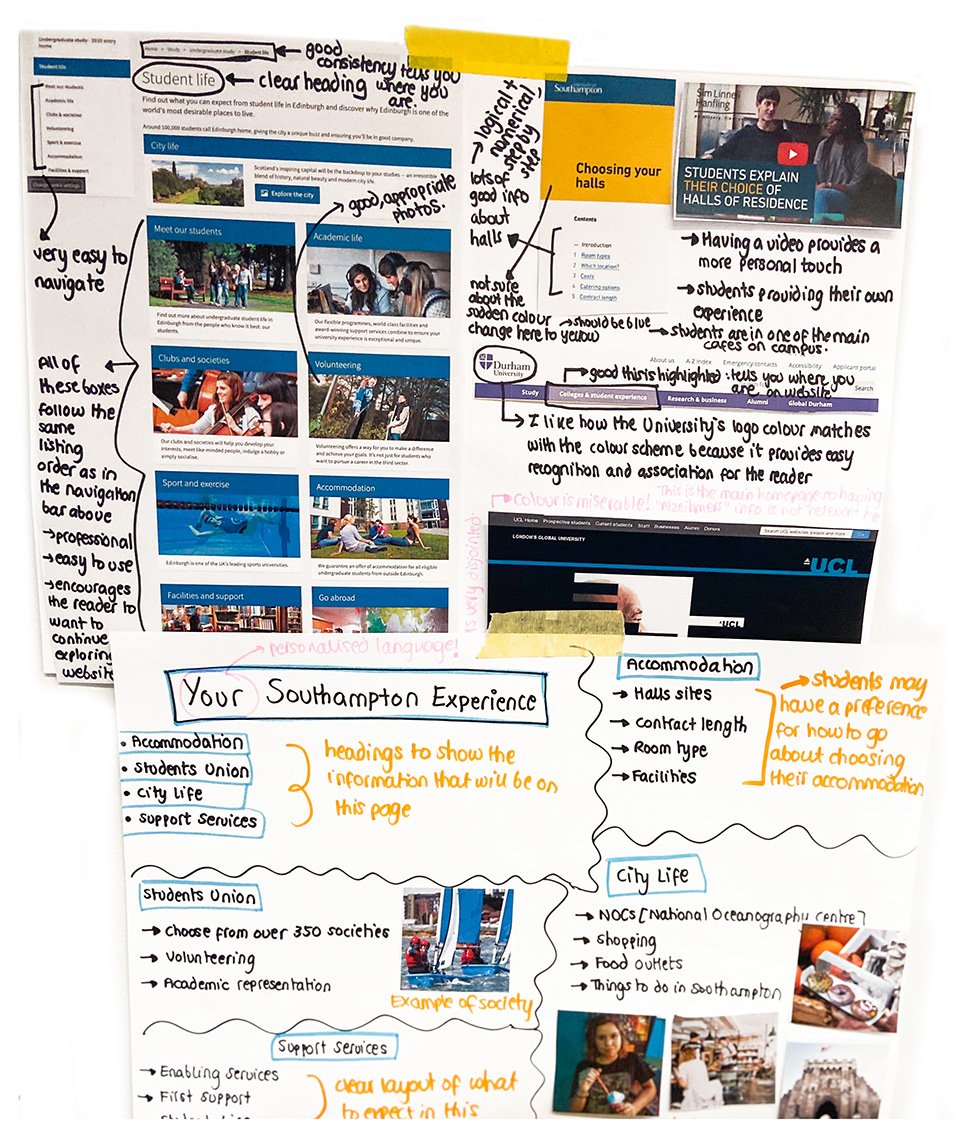
To supplement our quantitative data, we conducted user research, which included interviews, ideation workshops and prototype testing with prospective and first-year students.
The user needs for the ‘Student Life’ section centred around four main areas:
- Accommodation and campus: queries like ‘Is the accommodation nearby? What facilities are available? Can I walk to the campus?’
- Social and cultural inclusivity: questions like ‘Are there people like me there? What activities are available?’
- Support services for wellbeing and study: concerns such as ‘Will I feel safe and supported?’
- Costs and financial aid options: considerations like ‘How much will it cost? Can I afford it?’
In response, our designs incorporated:
- Engaging imagery that authentically reflects a diverse, inclusive, and active community
- Clear signposting to encourage users to explore areas of interest, including accommodation, campuses, the city, the student community, sports, wellbeing, and financial support
- A carefully structured site architecture to deliver the right information at key points in the user journey
- Designed pathways enabling easy navigation to related content
- Intuitive accommodation journeys with filters for exploring options based on users’ priorities such as location, price, and facilities
- Specific calls to action, encouraging users to attend an open day as their next step
Research
During the product design phase for the University’s research content, we employed various methods, including interviews and workshops, to understand the needs of our diverse user base.
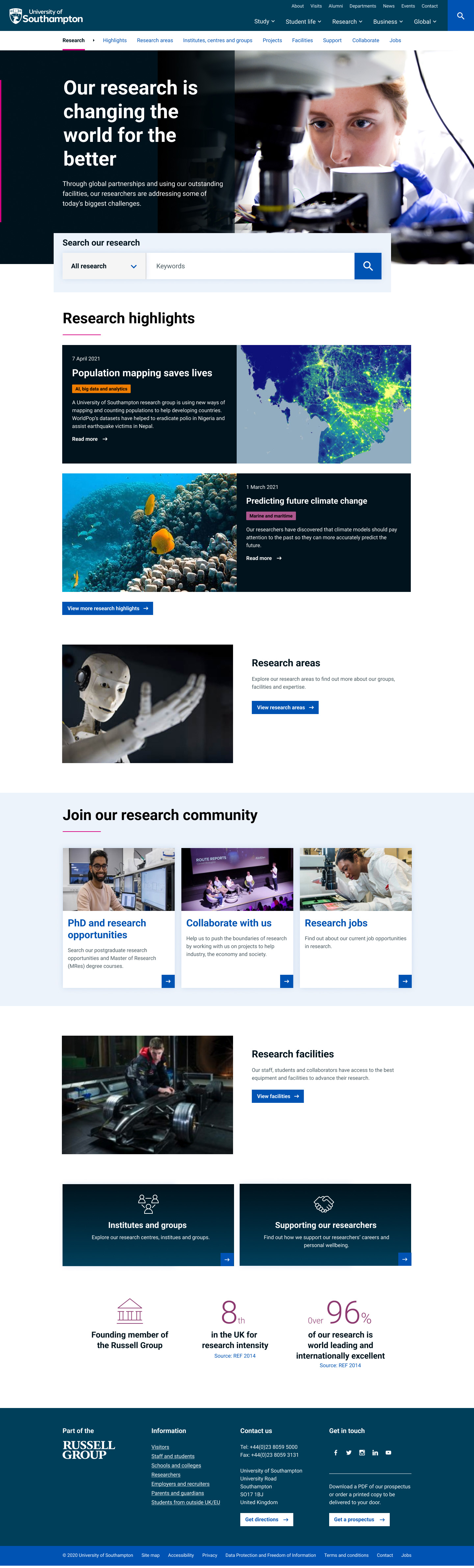
A key insight was that users frequently seek specific research activities and experts in particular fields. Our testing showed that a deep hierarchical website structure hindered users from efficiently finding information. Consequently, we developed a flat and shallow site structure, enhancing discoverability and simplifying navigation.
We incorporated in-page signposting to related content, ensuring clear navigation. The site architecture we designed enables users to navigate the content structure easily and search and filter key research content types.
The site is designed to encourage lateral exploration. Users can seamlessly transition between related concepts, such as moving from an individual researcher’s profile to their publications, research groups, and contact information.
This design approach was focused on making these natural user pathways clear and accessible, facilitating a more intuitive and user-friendly experience.
Staff profiles
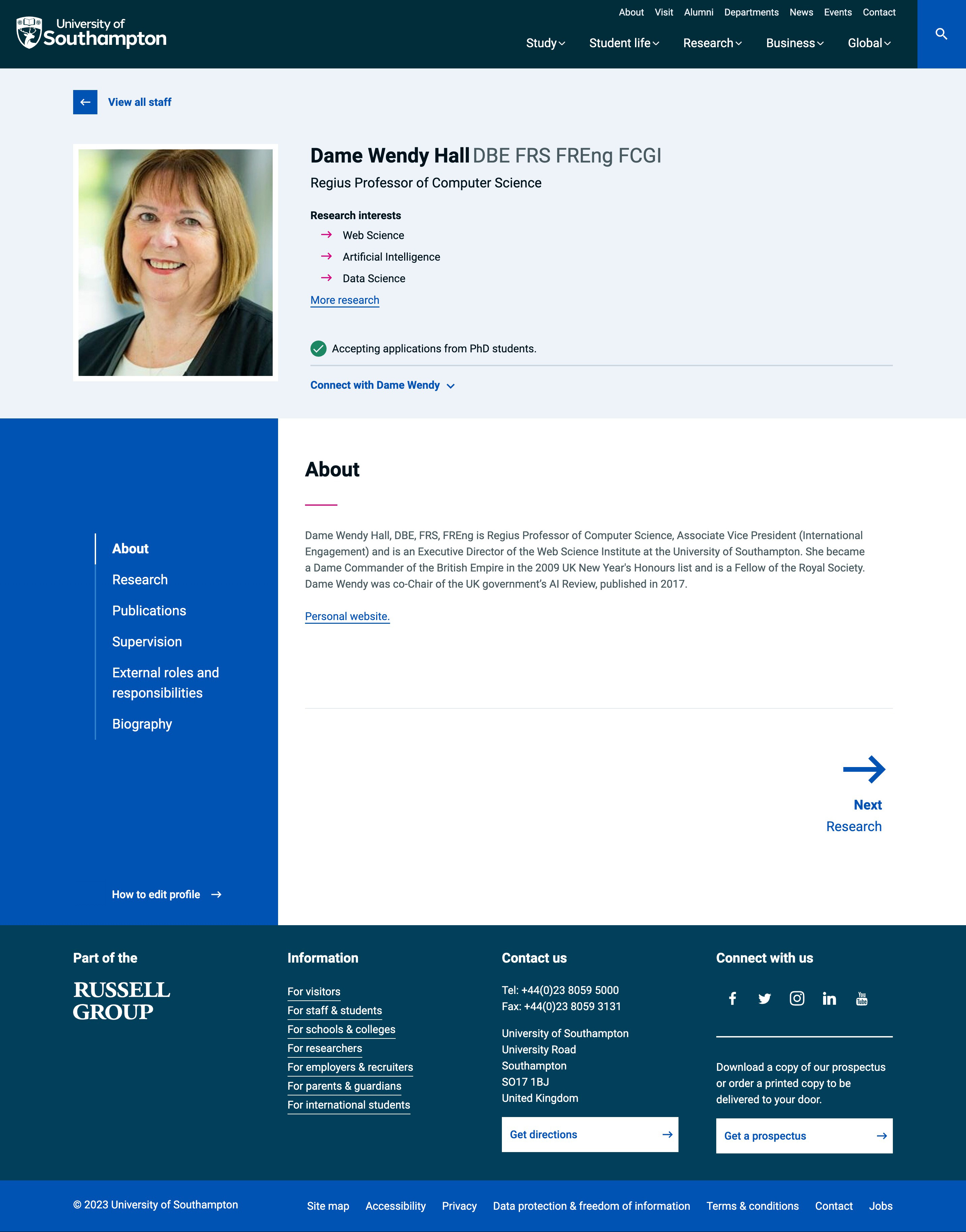
Showcasing expertise is a high priority for the University and its academics. Staff profiles cater to a broad audience, from prospective PhD students to enterprise partners. I led a multifaceted approach to make these profiles not only more accessible for staff but also more useful for our diverse user groups.
My role involved reducing friction for staff in updating their profiles due to a complex data landscape. I collaborated closely with content design, data system and faculty colleagues to roll out comprehensive guidance and training, all of which underwent usability testing.
A significant part of my contribution was designing the front-end user interface. I ensured it accommodated the varied information needs of our users, displaying everything from research interests and publications to projects and biographies. This comprehensive approach makes finding individuals with relevant expertise easier, fulfilling one of our primary objectives.
We further empowered faculty office staff with a customised dashboard, showing profile status and content elements, thus offering actionable insights into areas needing attention.
By integrating design, guidance, and dashboard features, the team created an ecosystem that helps keep staff profiles up-to-date and makes them an effective tool for showcasing the University’s academic and research expertise.
University ‘News’ discovery
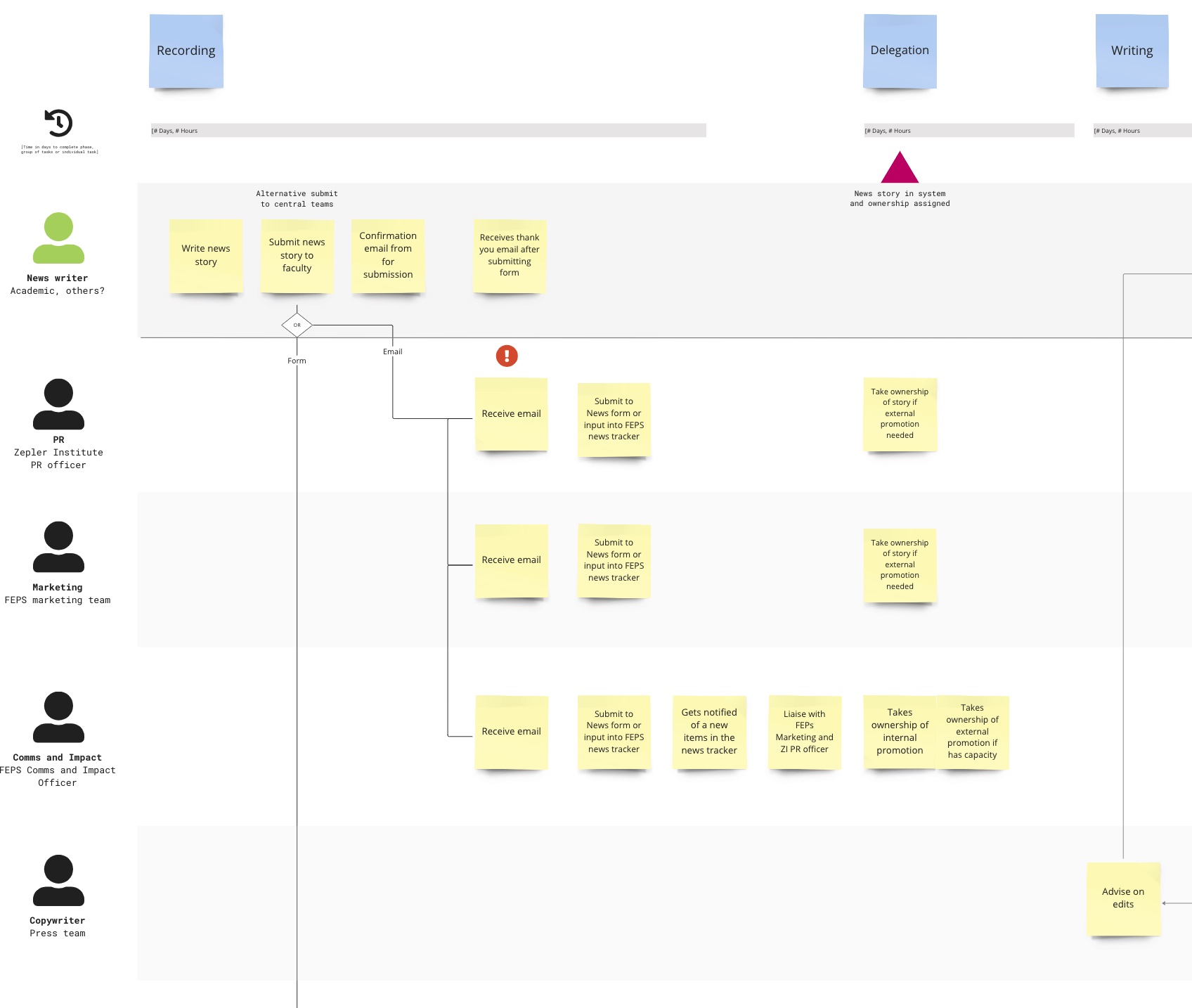
During the Discovery phase of the University’s News project, I collaborated with colleagues from the UX team, operational and academic stakeholders to thoroughly evaluate the University’s current news offerings. We aimed to identify opportunities and challenges and determine how to better align with the University’s strategic objectives.
I led the design and facilitation of workshops, where we mapped the as-is internal news creation and publication processes. This allowed us to identify specific issues and areas for improvement. Additionally, I guided junior team members in conducting competitor analysis and mapping current user journeys.
Our focus was on leveraging data-driven insights and fostering cross-departmental collaboration to address challenges such as low engagement rates and inconsistencies in news publishing.
The University’s Web Oversight Board approved the discovery report and recommendations, approving the project to proceed into the Alpha phase.
Postgraduate application portal
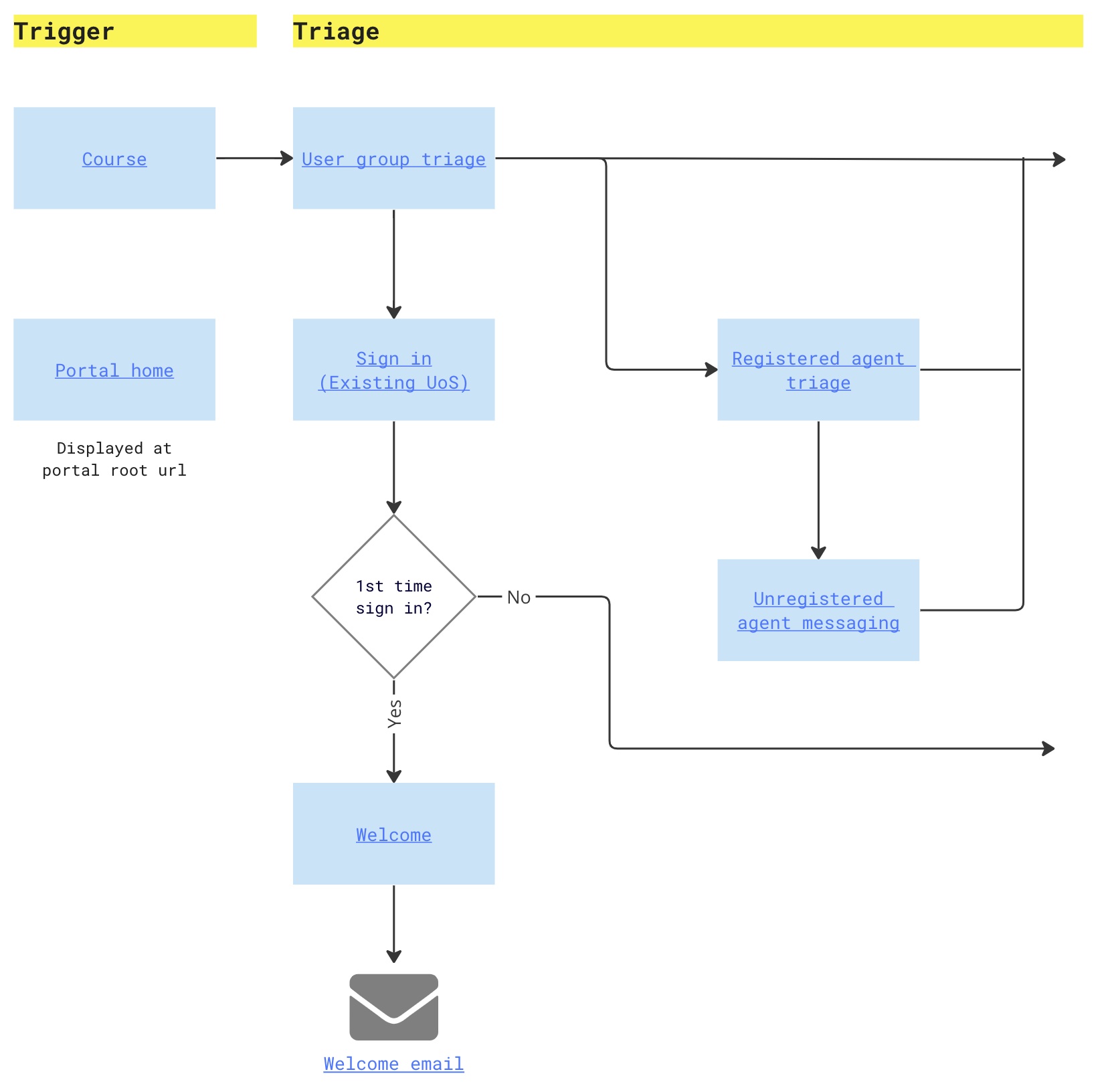
The development of the new Postgraduate Application Portal presented a complex challenge: simplifying the application process while reducing the administrative burden.
Collaborating with a content designer, I worked alongside both internal and external tech teams to create design solutions using the Microsoft Dynamics technology platform.
To manage time constraints, we adopted proven Gov.uk design patterns, focusing on user-centric solutions to foster an intuitive experience for prospective students.
Our approach led to designs that complied with WCAG 2.1 AA accessibility standards. Usability testing further validated the effectiveness of these designs.
This project exemplifies what can be achieved when prioritising user needs within complex technical constraints.
Testimonial
“Steve is one of those rare people who can wear many hats and move seamlessly between them.
I love having him as part of my team. He’s hard working, grasps a lot of information quickly, excellent at coaching and explaining concepts to stakeholders and colleagues. A true professional that gets a lot done quickly!
We’ve had some tough deliverables, but this never fazes him. He connects well with others, always trying to create the best, most useful experience for customers and as a result, improve the work of organisations and teams too.
Steve would always try to do his best for the team, project and client. As you can probably tell, I wouldn’t hesitate to recommend him fully.”